AI Notetaker
The AI notetaker that never joins your call
Cuelyte AI writes your meetings down from your own Mac or Windows PC and turns them into clear notes - summary, decisions and action items - the moment the call ends. And when someone asks you a question, it has an answer ready.
How it works
From call to notes in four steps
- Step 01
Open Meeting mode
Start Cuelyte AI on your Mac or Windows PC and pick a meeting mode - Team Meet, Sales Call, Lecture or your own.
- Step 02
Join your call as usual
Zoom, Google Meet, Microsoft Teams or any app that plays audio. Nothing joins the meeting with you.
- Step 03
Press the mic
Cuelyte AI writes down the other people from your computer's audio and you from your microphone, live.
- Step 04
End & write notes
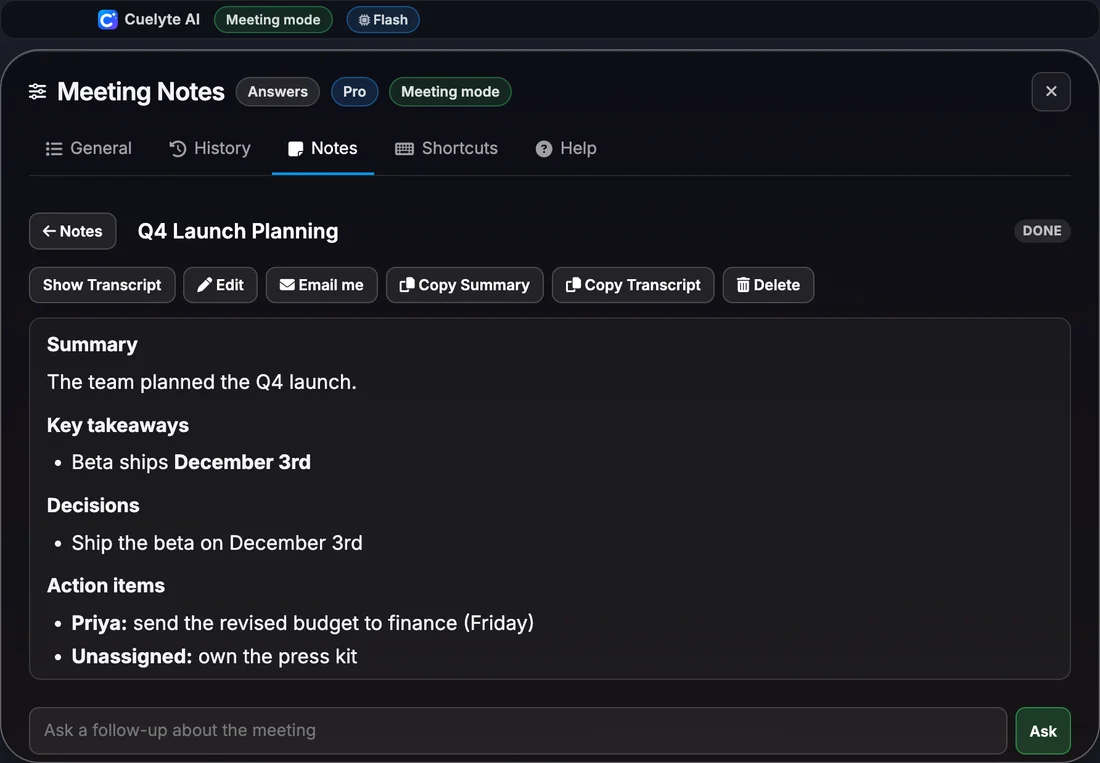
Get a title, summary, decisions and action items in seconds - saved on your computer, ready to email to yourself.
Structure
What is in your meeting notes
- Summary
- Two to four sentences: what the meeting was about and where it ended up.
- Key takeaways
- The important facts, numbers and points made - names, numbers and dates kept exactly as spoken.
- Decisions
- What was decided or agreed, so nobody has to remember it later.
- Action items
- Each task with its owner and due date when they were said, or marked Unassigned.
- Open questions
- What was left unanswered or needs a follow-up.
Included
Everything the notetaker does
- No bot joins your call - it listens on your own computer
- Live transcript as the meeting runs, with your voice marked You and everyone else Others
- Summary, key takeaways, decisions, action items and open questions when the meeting ends
- Ask follow-up questions about any meeting, like "what did we agree on pricing?"
- Search, edit and copy your notes, or reopen a meeting to keep adding to it
- Email the notes to yourself in one click, with a Word copy attached
- Notes in English, Hindi and six more languages; understands Hinglish
- Saved on your computer, and hidden from screen sharing with Hide mode
Compared
Cuelyte AI and other AI notetakers
Plans and prices from each company's own website on the date shown on its review page. Written by the Cuelyte AI team.
| Feature | Cuelyte AI | Otter | Granola | Fireflies | Fathom | Read AI | Notta |
|---|---|---|---|---|---|---|---|
| Joins the call as a bot | No - listens on your computer | Can join meetings as a bot | No - listens on your computer | Yes by default; a Chrome extension records without it | Yes by default; bot-free is a Mac beta | Joins meetings as an assistant | A bot, or a bot-free recorder on your device |
| Notes when the meeting ends | Summary, takeaways, decisions, action items, open questions | Yes | Yes | Yes | Yes | Yes | Yes |
| Instant answers during the call | Yes | Not a feature it lists | Not a feature it lists | Not a feature it lists | Not a feature it lists | Not a feature it lists | Not a feature it lists |
| Hidden from screen sharing | Yes, on every plan | Not a feature it lists - it is a note-taker | Not a feature it lists - it is a note-taker | Not a feature it lists - it is a note-taker | Not a feature it lists - it is a note-taker | Not a feature it lists - it is a note-taker | Not a feature it lists - it is a note-taker |
| Free plan | 20 minutes of listening and 20 answers a day | Basic: 300 transcription minutes a month, 30 minutes per conversation | Basic: AI notes with 30 days of meeting history | Free: transcription with 400 minutes of storage per team | Free: unlimited recordings and transcripts, instant AI summaries | Free: 5 meeting transcripts a month, up to 1 hour each | Free: 120 transcription minutes a month, 3 minutes per conversation, 10 AI summaries |
| Paid plan compared | Pro, $10 (₹999 in India) a month | Pro (billed monthly), $16.99 / month | Business, $14 / month | Pro (billed monthly), $18 / month | Premium (billed monthly), $20 / month | Pro (billed monthly), $19.75 / month | Pro (billed annually), $8.17 / month |
Want only notes for a whole team, with shared folders and CRM integrations? A dedicated notetaker like Otter or Granola may fit better. Want notes and help answering during the call, for less? That is what Cuelyte AI is for.
Platforms
AI notetaker for your call app
- AI notetaker for Zoom →
- AI notetaker for Google Meet →
- AI notetaker for Microsoft Teams →
- AI notetaker for Webex →
- AI notetaker for Slack →
- Also WhatsApp desktop, Zoho Meeting and any app that plays audio
Meeting types
AI notetaker for every kind of meeting
FAQ
AI notetaker: questions
What is an AI notetaker?
An AI notetaker listens to a meeting, writes a transcript and turns it into notes - a summary, decisions and action items - so you can follow the conversation instead of typing. Cuelyte AI does this from your own computer, without adding a bot to the call.
Does Cuelyte AI join my meeting as a bot?
No. It runs on your computer and listens to the audio your call app plays, plus your microphone for your own words. No bot or extra participant appears in Zoom, Google Meet or Teams.
What do the notes include?
A title, a short summary, key takeaways, decisions, action items with an owner and due date when they were said, and open questions. Sections with nothing to say are left out rather than padded.
Is there a free AI notetaker plan?
Yes. The Free plan includes 20 minutes of listening and 20 answers a day, with no card. Pro, Ultra Pro and Lifetime have unlimited listening, for longer meetings every day.
Where are my meeting notes stored?
On your computer. Call audio passes through Cuelyte's server to be transcribed and is not stored there; notes are only emailed when you press Email me.
Does it work for Hindi and Hinglish meetings?
Yes. It understands English, Hindi and the two mixed in one sentence, and can write the notes in English, Hindi, Spanish, French, German, Portuguese, Arabic or Chinese.
Can it also help me during the meeting?
Yes - that is the difference from most notetakers. While it takes notes, you can ask for an instant answer to the question just asked, on a window that stays hidden from screen sharing.
Take notes on your next meeting - without a bot
Start free in a minute - no card needed. Pro is $10 a month with unlimited listening.