AI notetaker for Google Meet
AI Notetaker for Google Meet
Cuelyte AI writes down your Google Meet meetings from your own computer and turns them into notes when the call ends - no bot in the participant list, nothing to install in Google Meet.
Most Google Meet notetakers work by sending a bot into the meeting. It shows up as an extra participant, everyone is asked to let it in, and some companies block it outright.
Cuelyte AI takes the other route. It runs on your Mac or Windows PC and hears Google Meet the way you do - through Google Meet in Chrome, Edge, Safari or any other browser - plus your microphone for your own words. The meeting sees nothing new.
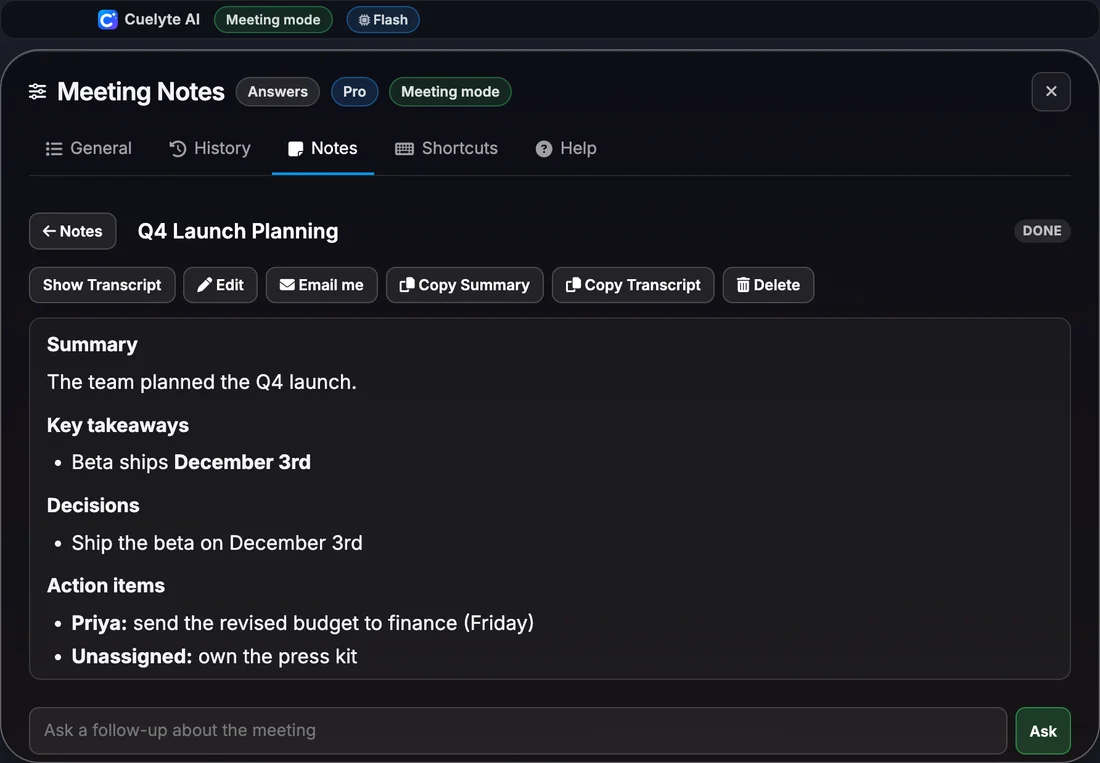
How it works
Taking notes on a Google Meet call
- Step 1
Open Meeting mode
Start Cuelyte AI on your Mac or Windows PC and pick a meeting mode - Team Meet, Sales Call, Lecture or your own.
- Step 2
Join your call as usual
Zoom, Google Meet, Microsoft Teams or any app that plays audio. Nothing joins the meeting with you.
- Step 3
Press the mic
Cuelyte AI writes down the other people from your computer's audio and you from your microphone, live.
- Step 4
End & write notes
Get a title, summary, decisions and action items in seconds - saved on your computer, ready to email to yourself.
Meet runs in your browser, so there is nothing to install on the Meet side - Cuelyte AI hears the tab's audio like any other sound on your computer.
What the notes capture
- Everyone else on the call, from the audio your computer plays
- Your own words, from your microphone, marked You
- Names, numbers and dates exactly as they were said
- Decisions and action items, with owners when someone was named
Every set of notes has
Summary, Key takeaways, Decisions, Action items, Open questions.
Everything the notetaker does
- No bot joins your call - it listens on your own computer
- Live transcript as the meeting runs, with your voice marked You and everyone else Others
- Summary, key takeaways, decisions, action items and open questions when the meeting ends
- Ask follow-up questions about any meeting, like "what did we agree on pricing?"
- Search, edit and copy your notes, or reopen a meeting to keep adding to it
- Email the notes to yourself in one click, with a Word copy attached
- Notes in English, Hindi and six more languages; understands Hinglish
- Saved on your computer, and hidden from screen sharing with Hide mode
AI Notetaker for Google Meet: questions
Do other people on the Google Meet call see a notetaker?
No. Cuelyte AI never joins the Google Meet meeting, so there is no bot or extra name in the participant list. If you use Present now, turn on Hide mode and its window stays out of what you share too.
Do I need Google Meet admin rights or an integration?
No. Cuelyte AI does not sign in to Google Meet or connect to your account. It listens to the sound Google Meet plays on your computer, so it works on any Google Meet plan.
Does it work with headphones on Google Meet?
Yes. It reads your computer's audio output directly, so it hears the call through speakers or headphones.
Should I tell people I am taking notes?
Yes - let people know when you are writing a meeting down, and follow your company's policy and local law on recording.
Take notes on your next Google Meet call
Start free in a minute - no card needed. Pro is $10 a month with unlimited listening.